Google Pay
Add your INDEXO Bank card to Google Wallet and pay with your Android phone or smartwatch – no PIN, no worries.


Fast and convenient payments

Extra security for payments

Even easier online and in apps
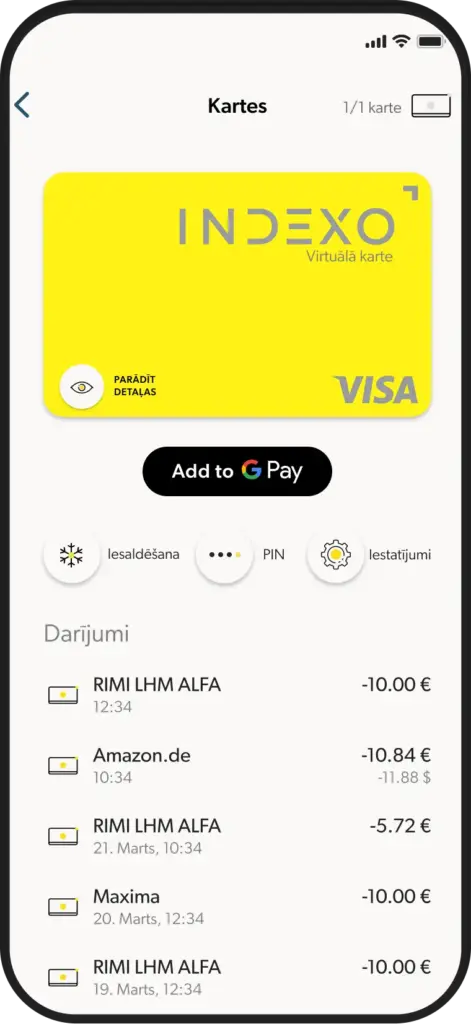
How to add your card to Google Wallet?
Open the INDEXO Bank app
Go to the cards section
Tap 'Add to Google Wallet'
Pay with a single touch
Now you can pay with your INDEXO Bank card wherever you see this symbol in stores, online or in your favourite apps. With Google Pay, it’s that simple.

Questions and answers
Where can I use Google Pay?
For the first time, residents of Latvia can add a local bank – INDEXO Bank – card to their Google Wallet and make payments with Google Pay. Locals can!
Pay with your INDEXO Bank card everywhere you see the contactless payment symbol – in stores, online and in apps where the Google Pay logo is displayed. All you need is your Android phone or smartwatch.
I already have other bank cards in Google Pay wallet, do I need to delete them?
No. You can add your INDEXO Bank card as an additional payment method. Google Wallet allows you to store multiple cards at once.
Which card will be used if I have several in my wallet?
At the time of payment, you can choose which card to pay with. For your convenience, you can set your INDEXO Bank card as the default card. Here is how:
Open Google Wallet
Find your INDEXO Bank card by swiping cards from right to left
Tap on the INDEXO Bank card
Tap on Detailed information and Set as default for contactless payments.
What should I do if I lose my INDEXO Bank card but it is linked to Google Wallet? Can I still pay with my phone?
Immediately block your card in the INDEXO Bank mobile app. With a blocked card, payments, including Google Pay, will not be accepted.
What should I do if I lose the device linked to my INDEXO Bank card? Can I still pay with my physical card?
Contact us to block card usage with Google Pay. In the meantime, you can still pay with your physical INDEXO Bank card. On your new device, you can add the card to Google Wallet again.